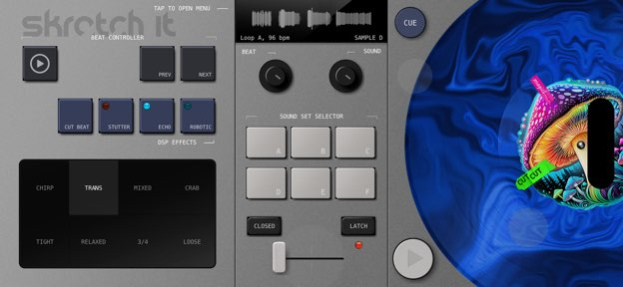
About Skratch It
・Transform your iPhone and iPad into a portable DJ set designed for the art of scratching・ We’re excited to bring you an app that redefines the possibilities of dj scratching with a single hand-held device, ready to be...
・Transform your iPhone and iPad into a portable DJ set designed for the art of scratching・ We’re excited to bring you an app that redefines the possibilities of dj scratching with a single hand-held device, ready to be used on the go, anywhere you want. Skratch it! transforms your iOS device into mobile turntable / mixer / loop player combo, allowing you to instantly experience limitless possibilities right at your fingertips. ・Seamless scratch experience・ Thanks to the implementation of a highly responsive virtual deck and a semi-automated mixer’s crossfader, it is possible to achieve both precision and finesse of performance even for beginners. The mixer section offers eight, carefully selected, crossfader movement patterns that are automatically synced with the tempo of background music playback. These can be easily combined together by the swipe gestures, allowing to create endless combinations of the scratching sounds. The app comes with a selection of six different sound sets, containing most of the all-time classic samples together with some fresh beeps, squelches and rough noises! Eager to cut and bend your own sounds? Importing custom samples is also possible. ・Packed with useful features・ - Dope selection of background music tracks (80 - 140 bpm) - 6 pads for switching between different scratching sounds sets - Mixer unit with pattern-driven tempo-synced and manual modes of the crossfader - Responsive, large, virtual deck with triggers for performing “stab” and “faderless” tricks - Possibility to cue and trigger selected part of the record - 4 different DSP effects - Live recording to WAV (record your performance with or without the background music) - Importing of custom samples (44.1khz, stereo, 16-bit WAV files) - Tap tempo button for fast tweaking of the playback speed - Audio routing (audio output from the app can be routed to another app that supports IAA) - Built-in tutorial - Hours of fun and engaging experience!
Version History - it's now possible to import custom samples with a maximum length of 8 seconds. - a button opening a tutorial on importing samples has been added 1.3.1 05/16/2024 - minor UI improvements 1.1.0 03/19/2024 1.0 03/11/2024
Previous Versions
Here you can find the changelog of Skratch It since it was posted on our website on 2026-02-13 18:56:31.
The latest version is 1.3.1 and it was updated on 2026-10-12 20:13:51. See below the changes in each version.
Skratch It version 1.3.1
Updated At: 2026-10-08
Changes: Version History - it's now possible to import custom samples with a maximum length of 8 seconds.
- a button opening a tutorial on importing samples has been added 1.3.1 05/16/2024 - minor UI improvements 1.1.0 03/19/2024 1.0 03/11/2024
Skratch It version 1.3.1
Updated At: 2024-05-16
Changes: - it's now possible to import custom samples with a maximum length of 8 seconds.
- a button opening a tutorial on importing samples has been added
Disclaimer
Official App Store Link
We do not host Skratch It on our servers. We did not scan it for viruses, adware, spyware or other type of malware. This app is hosted by Apple and passed their terms and conditions to be listed there. We recommend caution when installing it.
The App Store link for Skratch It is provided to you by apps112.com without any warranties, representations or guarantees of any kind, so access it at your own risk.
If you have questions regarding this particular app contact the publisher directly. For questions about the functionalities of apps112.com contact us.